Showing posts with label operating system. Show all posts

Friday, October 25, 2013


Sticky bit is a bit set in permission of a file or directory to give special access –rights to user. When we set the sticky bit for any executable file, it will remain in swap space after the process exited. It will help to reduce time of execution in repeatedly used programs. So, we can set this sticky bit for frequently used programs like editors, commands etc. So, execution of them will be faster as compared to without sticky bit.
Main important use of sticky bit is on directory, when we set sticky bit for directory then files reside in the directory can delete or rename by owner only. This is helpful not to give access for renaming or deletion to unauthorized user. When sticky bit is not set for directory then any user having permission to write and execute on directory can rename and delete files inside the directory.

Sticky bit behavior or feature changes as per operating system. Linux Kernel ignores the sticky bit on files, it considers only on directories. In HP-UX work on sticky bit as above mentioned. In AIX, if we set the sticky bit for directory then only owner can link or unlink the directory or files specified in the directory.

How to set Sticky bit on file/directory in Linux?

We will set sticky bit by chmod command. For this purpose, we can use octal mode or by its symbol ‘t’. lets go through the example.

//Check the permissions of directory sticky
redhat@localhost:~/mywork$ ls -l
total 4
drwxr-xr-x 2 redhat adm 4096 2013-10-24 15:36 sticky
redhat@localhost:~/mywork$ ls -l sticky/                            //inside directory permissions
total 8
-rwxr-xr-x 1 redhat adm 57 2013-10-24 15:35 stickybit.sh
-rwxr-xr-x 1 redhat adm 57 2013-10-24 15:36 stickybit.sh_bak
//Adding sticky bit in permission by below syntax ..or use - chmod 1755 sticky
redhat@localhost:~/mywork$ chmod +t sticky/                         
redhat@localhost:~/mywork$ ls -l sticky/
total 8
-rwxr-xr-x 1 redhat adm 57 2013-10-24 15:35 stickybit.sh
-rwxr-xr-x 1 redhat adm 57 2013-10-24 15:36 stickybit.sh_bak
redhat@localhost:~/mywork$ ls -l
total 4
drwxr-xr-t 2 redhat adm 4096 2013-10-24 15:36 sticky
//In above line sticky bit added in permissions
redhat@localhost:~/mywork$


Now we have set the sticky bit to directory. Now we will try to remove file or script inside the directory.

//Changing the user. Sandeep and redhat having same group.
redhat@localhost:~/mywork/sticky$ su - Sandeep
Password:
Sandeep@localhost:~$
Sandeep@localhost:~$ pwd
/home/Sandeep
Sandeep@localhost:~$ cd ../redhat            //Change Directory to that sticky bit directory
Sandeep@localhost:/home/redhat$ ls
mywork
Sandeep@localhost:/home/redhat$ ls -l
total 4
drwxr-xr-x 3 redhat adm 4096 2013-10-24 15:39 mywork
Sandeep@localhost:/home/redhat$ cd mywork/
Sandeep@localhost:/home/redhat/mywork$ ls -l
total 4
drwxr-xr-t 2 redhat adm 4096 2013-10-24 15:36 sticky
Sandeep@localhost:/home/redhat/mywork$
Sandeep@localhost:/home/redhat/mywork$ cd sticky/
Sandeep@localhost:/home/redhat/mywork/sticky$ ls
stickybit.sh  stickybit.sh_bak
//Trying to remove sticky bit set directory content ..getting error permission denied
Sandeep@localhost:/home/redhat/mywork/sticky$ rm stickybit.sh
rm: remove write-protected regular file `stickybit.sh'? y
rm: cannot remove `stickybit.sh': Permission denied
Sandeep@localhost:/home/redhat/mywork/sticky$

Permission denied while removing the file which resides into the directory whose sticky bit has been set already. This is the actual use of sticky bit on directory.

How to remove sticky bit of directory/file ?

We need to login by redhat or root user before removing sticky bit then only we can remove the Sticky bit.

redhat@localhost:~/mywork$ ls –l
total 4
drwxr-xr-t 2 redhat adm 4096 2013-10-24 15:36 sticky
//use below syntax or use – chmod 755 sticky
redhat@localhost:~/mywork$ chmod -t sticky/
redhat@localhost:~/mywork$ ls -l
total 4
drwxr-xr-x 2 redhat adm 4096 2013-10-24 15:36 sticky
redhat@localhost:~/mywork$


Drop an email if you have any query regarding the Linux issue or like our page on Facebook and post a query.
Posted by Machindra Dharmadhikari On 10/25/2013 09:29:00 PM No comments READ FULL POST

Wednesday, October 23, 2013

Sticky bit concept and implementation                                      Check CPU usage of file system

SetUID:

SetUID is a set User ID upon execution. We can identify SetUID bit is set or not in permissions of file by long listing the details of file as below.

[linuxconcepts@localhost test]$ cat > setuid.sh
#!/bin/sh
echo "SET USER ID BIT";
date
[linuxconcepts@localhost test]$
[linuxconcepts@localhost test]$ ls -l setuid.sh
-rw-rw-r--. 1 linuxconcepts linuxconcepts 39 Oct 23 12:08 setuid.sh
[linuxconcepts@localhost test]$ chmod 4755 setuid.sh
[linuxconcepts@localhost test]$ ls -l setuid.sh
-rwsr-xr-x. 1 linuxconcepts linuxconcepts 39 Oct 23 12:08 setuid.sh
[linuxconcepts@localhost test]$
//We can set setUID bit by following method as well
[linuxconcepts@localhost test]$ touch setuid1.sh
[linuxconcepts@localhost test]$ ls -l setuid1.sh
-rw-rw-r--. 1 linuxconcepts linuxconcepts 0 Oct 23 13:22 setuid1.sh
[linuxconcepts@localhost test]$ chmod u+s setuid1.sh
[linuxconcepts@localhost test]$ ls -l setuid1.sh
-rwsrw-r--. 1 linuxconcepts linuxconcepts 0 Oct 23 13:22 setuid1.sh
[linuxconcepts@localhost test]$

We can see ‘s’ letter in permission of a setuid.sh file when we change permissions to 4755. We use 4 before actual permission digit to setUID bit to any file.

Benefit: When we set the setUID bit in linux then that script will execute with its owner’s permission. Means if any user is executing that script who have execution permission then it will execute with owner’s permission.

Generally, setUID bit is disabled in most of unix like operating systems because it is unsecure and it gives full access to execute the script.

We can remove setUID bit as follows:

[linuxconcepts@localhost test]$ chmod u-s setuid1.sh
[linuxconcepts@localhost test]$ ls -l setuid1.sh
-rw-rw-r--. 1 linuxconcepts linuxconcepts 0 Oct 23 13:22 setuid1.sh
[linuxconcepts@localhost test]$
SetGID :

SetGID is a set group ID upon execution. It is same as setUID. But setUID is for user and setGID bit is in linux is for group. It can bet set and remove as follows.

[linuxconcepts@localhost test]$ ls -l setuid1.shroup
-rw-rw-r--. 1 linuxconcepts linuxconcepts 0 Oct 23 13:22 setuid1.sh
[linuxconcepts@localhost test]$
[linuxconcepts@localhost test]$ chmod 2755 setuid1.sh
[linuxconcepts@localhost test]$  ls -l setuid1.sh
-rwxr-sr-x. 1 linuxconcepts linuxconcepts 0 Oct 23 13:22 setuid1.sh
[linuxconcepts@localhost test]$ chmod u-s setuid1.sh
[linuxconcepts@localhost test]$ ls -l setuid1.sh
-rwxr-sr-x. 1 linuxconcepts linuxconcepts 0 Oct 23 13:22 setuid1.sh
[linuxconcepts@localhost test]$

Generally SetGID or SetUID bit is set for commands or service commands.

You might be interested in other posts. Have a look on it :

Jinfo command to get details about java process                  Jstat command in Linux
Posted by Machindra Dharmadhikari On 10/23/2013 09:41:00 PM No comments READ FULL POST

Monday, June 3, 2013

Netstat Command in Linux                                                               vmstat Command in Linux

It is very easy to check local network speed in Windows but if you have putty access to Linux machine then we are facing issues to check the network speed. There are some tools are available to check network speed iin Linux but it is not possible to install this tools on client machine or our secured machine.

Network speed in linux is depend on the Ethernet card or network interface card which you are using for this machine. Might be there are multiple Ethernet cards already configured, we can check network speed for each separately.

Generally, Ethernet cards are configured. If we see the the output of below command then we will get all NICs.

root@hello:~# ifconfig -a
eth0   Link encap:EthernetHWaddr 1c:6f:65:0b:00:eb
          inet addr:10.136.25.42  Bcast:10.136.25.255  Mask:255.255.255.0
          inet6 addr: fe80::1e6f:65ff:fe0b:eb/64 Scope:Link
          UP BROADCAST RUNNING MULTICAST  MTU:1500  Metric:1
          RX packets:1133376 errors:0 dropped:0 overruns:0 frame:0
          TX packets:34516 errors:0 dropped:0 overruns:0 carrier:0
          collisions:0 txqueuelen:1000
          RX bytes:11234117 (113.8 MB)  TX bytes:9056744 (9.0 MB)
          Interrupt:16 Memory:fc500000-fc520000

lo       Link encap:Local Loopback     
          inet addr:127.0.0.1  Mask:255.255.0.0
          inet6 addr: ::1/128 Scope:Host
          UP LOOPBACK RUNNING  MTU:16436  Metric:1
          RX packets:20442 errors:0 dropped:0 overruns:0 frame:0
          TX packets:20442 errors:0 dropped:0 overruns:0 carrier:0
          collisions:0 txqueuelen:0
          RX bytes:2356951 (2.3 MB)  TX bytes:2356951 (2.3 MB)
root@hello:~#

If we see in above output, there are two cards configured. But eth0 is the main. So we need to check network speed for it only.

For Ethernet card,

root@hello:~# ethtool eth0 | less

If this command is not found then go for below command

root@hello:~# dmesg  | grep -i duplex
[   16.773492] e100e: eth0 NIC Link is Up 100 Mbps Full Duplex, Flow Control: None
root@hello:~#

Above command will be helpful to check system is half duplex or full duplex. Dmesg command gives lots of information but it is not that much of useful for us just grep needed information.

                We can check network speed of wireless card and chipset information.

                root@hello:~#lspci | grep -i wireless

                To test internet connection speed from the console over ssh command line, we need to install lftp and iperf packages. They are easily available. We can download rpm of them or install it from yum repository.

After installation, download or upload data by lftp, pget command or check network speed between two IPs by iperf command.


I got some useful information regarding this topic on one site. Please go through it.

Check CPU usage in Linux                                                                usermod command in Linux
Posted by Machindra Dharmadhikari On 6/03/2013 08:38:00 PM 3 comments READ FULL POST

Friday, April 26, 2013


Before understanding the difference between soft link and hard link, we need to understand the concept of soft link and hard link as well as concept of Inode in unix file system. Actually, link concept originated to replicate the file at different location without copying it and it is based on file system. File System is closely related withinode which is unique in system.

How to create Soft Link in Linux?

We will create soft link as well as hard link in two examples and then we will check for difference.

root@hello:~/ctier/shellscript# pwd
/root/hello/shellscript
root@hello:~/ctier/shellscript# ls -li shellscript.sh
5644164 -rwxr-xr-x 1 root root 446 2013-04-17 17:48 shellscript.sh
root@hello:~/ctier/shellscript# ln -s /root/ctier/shellscript/shellscript.sh /root/ctier/test/shells.sh
root@hello:~/ctier/shellscript# ls -li /root/ctier/test/shells.sh
6554654 lrwxrwxrwx 1 root root 16 2013-04-24 22:10 /root/ctier/test/shells.sh -> /root/hello/shellscript/shellscript.sh
root@hello:~/ctier/shellscript#

As per above example, we have created soft link of shellscript.shto this file /root/ctier/test/shells.sh. i.e. new file is /root/ctier/test/shells.sh. If you check inode of new file, it is different. And in long listing, it is showing that it points to some other file. Size of file is different at both the locations. Because in soft link, there is no copy of file, it is just pointing to the original location. If we are trying to open a /root/ctier/test/shells.sh this file, then it will open original file i.e. /root/ctier/shellscript/shellscript.sh. If we made any changes in original file then it will reflect in soft linked file as well.

How to create Hard Link in Linux?

root@hello:~/hello/shellscript# ls -li shellscript.sh
5644164 -rwxr-xr-x 1 root root 446 2013-04-17 17:48 shellscript.sh
root@hello:~/hello/shellscript# mkdir test
root@hello:~/hello/shellscript# ln shellscript.sh ./test/hardlink.sh
root@hello:~/hello/shellscript# ls -li ./test/hardlink.sh
5644164 -rwxr-xr-x 2 root root 446 2013-04-17 17:48 ./test/hardlink.sh
root@hello:~/hello/shellscript#

If you see above example of hardlink then you can understand thatin hard link, file’s new copy is created at new location with its original size. Original file’s changes will reflect in new file. But there is no linking showing in long listing because new file is pointing to the original file’s inode. if we delete any one of file or original file then it will not impact on this hard link. Another file will be accessible.

Difference between Soft Link and Hard Link

Difference
Soft Link
Hard Link
Inode
Inode will be different for both the files
Inode will be same for both the files
Deletion of original file
Deletion of original file, impact on link. Another file will not be accessible.
Deletion of original file, no impact on link. Another file will be accessible.
Time to execute
Access time is slow as compared to hard link
Access time is fast as compared to soft link
Cross File System
In Cross file system, Soft link works
In cross file system, hard link is not working. Needed same file system


Posted by Machindra Dharmadhikari On 4/26/2013 10:03:00 AM No comments READ FULL POST
Advanced use of sed command in Linux                              mpstat command to check cpu usage

Inode in file system is a fundamental concept of unix file system and each object in the file system represented by an inode. Inodes store information about files and directories like ownership, access mode, file type etc. Each file is having unique inode. When we copy file from one location to other that time new inode number assigned to the new file.

If you want to see the inode number of file then use following command:

root@hello:~/hello/shellscript# ls -i shellscript.sh
5644164 shellscript.sh
root@hello:~/hello/shellscript#

5644164 is the inode of shellscript.sh file.
We will copy this file in other location and check the inode for same file:

root@hello:~/hello/shellscript# mkdir test
root@hello:~/hello/shellscript# cp shellscript.sh test/
root@hello:~/hello/shellscript# cd test
root@hello:~/hello/shellscript/test#ls -i shellscript.sh
5770669 shellscript.sh
root@hello:~/hello/shellscript/test#

You can see same file is having different Inode5770669. i.e. Each file is having unique inode.

Inode stores following information
  • File Size
  • File Type
  • File modification time
  • File Change time
  • File Access time
  • File deletion time
  • Permission
  • Owner
  • Group

Inode contains above information about file.

There is another way to check the inode of a file by stat command.

root@hello:~/hello/shellscript/test# stat shellscript.sh
  File: `shellscript.sh'
  Size: 446             Blocks: 8          IO Block: 4096   regular file
Device: 801h/2049d      Inode: 5770669     Links: 1
Access: (0755/-rwxr-xr-x)  Uid: (    0/    root)   Gid: (    0/    root)
Access: 2013-04-24 21:30:46.473060619 +0530
Modify: 2013-04-24 21:30:46.493059771 +0530
Change: 2013-04-24 21:30:46.493059771 +0530
root@hello:~/hello/shellscript/test#

Stat command provides the detailed statistics of file. Access Permissions, type of file, IO Block, Size, Device information etc information provided by stat command. Inode is most important concept in Unix operating system.

Inode do not contain file name but it stores metadata of a file.
Posted by Machindra Dharmadhikari On 4/26/2013 10:01:00 AM No comments READ FULL POST

Monday, April 15, 2013

10 basic tricks of Sed Command                                                  Advanced tricks of Sed command

SAN and NAS are two different types of storage or backup systems. Before understanding the difference between them, we need to understand concept of NAS and SAN. In SAN, data copied block oriented and in NAS, data copied or it will have access at file level. Server attached storage faces many problems, that’s why to replace this kind of storage SAN or NAS is the best option.

 Storage Area Network:

SAN is the storage area network which is useful for long distance storage. i.e. Name defines that storage of some area network. it is fast as compared to NAS copying speed. Fibre optics cable is used for this network.


  • SANs are networked infrastructures designed to provide a high performance, flexibility in use and scalable storage environment. 
  • Fibre Channel switches and fibre channel network protocols used in SANs, and it makes device connections reliable and efficient. 
  • Data copied from server to storage devices in blocks which make it faster.
  •  SANS are used for wide variety of applications where we need less response time, storage scalability while accessing storage. If we need centralized storage for applications in which performance, data integrity and reliability matters for us then we should have to go with SAN.
  • SAN provides high availability and application failover environment as well.
  • Up to 150KM distance, SAN provides high fibre channel performance.

Recommended Article :   How to Run Windows software on Unix/Linux OS


 Network Attached Storage:


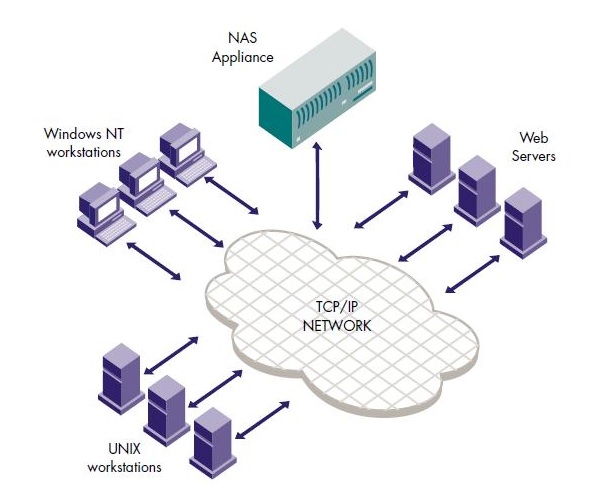
It is a storage which accessed by workstations or servers through a network protocol like TCP/IP protocol and applications like NFS (Network File System) or Common Internet File System (CIFS) used for file access. NAS appliances are really very easy to deploy in running environments. We can easily add file storage capacity to infrastructure.


·         NAS is suitable for those applications where we need to deliver file data to multiple client machines over the network.
·         NFS(Network File System) used in Unix and CIFS used in Windows for NAS file sharing tasks.
·         NAS clients can access the files from anywhere in the organization.

Difference between SAN and NAS as in following diagram:


NAS applications are now increasingly using SANs to solve operational problems associated with storage expansion and data backup or restore.  

Logical Volume Manager                                              How to Run Unix commands on Windows OS
Posted by Machindra Dharmadhikari On 4/15/2013 11:22:00 PM 7 comments READ FULL POST

Thursday, December 27, 2012

Linux Boot Loader                                                           Features of Bash Shell

It is very easy to learn bash shell scripting. There are different Unix shells like bash, ksh, zsh, sh etc. Please make sure that which shell do you want to use while running the script, because syntax of each shell might be different. Before going to develop shell script, your logic or flow of the script should be clear then only you can develop shell script very easily. It is very important to have clear understanding of when or where not to use shell script


For Fibonacci series shell script, need to know the exact number series. It will be as :

1              1              2              3              5              8              13           21            34          etc.

Please see below is the script to get desired output. 

######################Fibonacci.sh###############################

echo "How many numbers do you want of Fibonacci series ?"

  read total

  x=0

  y=1

  i=2

  echo "Fibonacci Series up to $total terms :: "

  echo "$x"

  echo "$y"

  while [ $i -lt $total ]

  do

      i=`expr $i + 1 `

      z=`expr $x + $y `

      echo "$z"

      x=$y

      y=$z

  done

Click to  know more about: Difference of Linux and Unix

#####################################################################

Now just save it as Fibonacci.sh and give the input as how many numbers you want of . Your output will be as follows: 

#####################################################################

root@hello:~/ctier/test/JBoss#

root@hello:~/ctier/test/JBoss# ./Fibnonacci.sh

How many numbers do you want of Fibonacci series ?

10

Fibonacci Series up to 10 terms ::

0

1

1

2

3

5

8

13

21

34

root@hello:~/ctier/test/JBoss#

#####################################################################

Before developing this script you should have clear understandings of while loop in shell script  and addition of numbers i.e. mathematical calculations in shell script.


mpstat command in Linux                                                        Ubuntu 12.10 features
Posted by Machindra Dharmadhikari On 12/27/2012 04:53:00 PM 1 comment READ FULL POST
  • RSS
  • Delicious
  • Digg
  • Facebook
  • Twitter
  • Linkedin
  • Youtube

    Chitika Ads 2

    Histat

    About

    Enter your email address:

    Delivered by FeedBurner